
Quotes / Estimates — step-by-step for first-time users
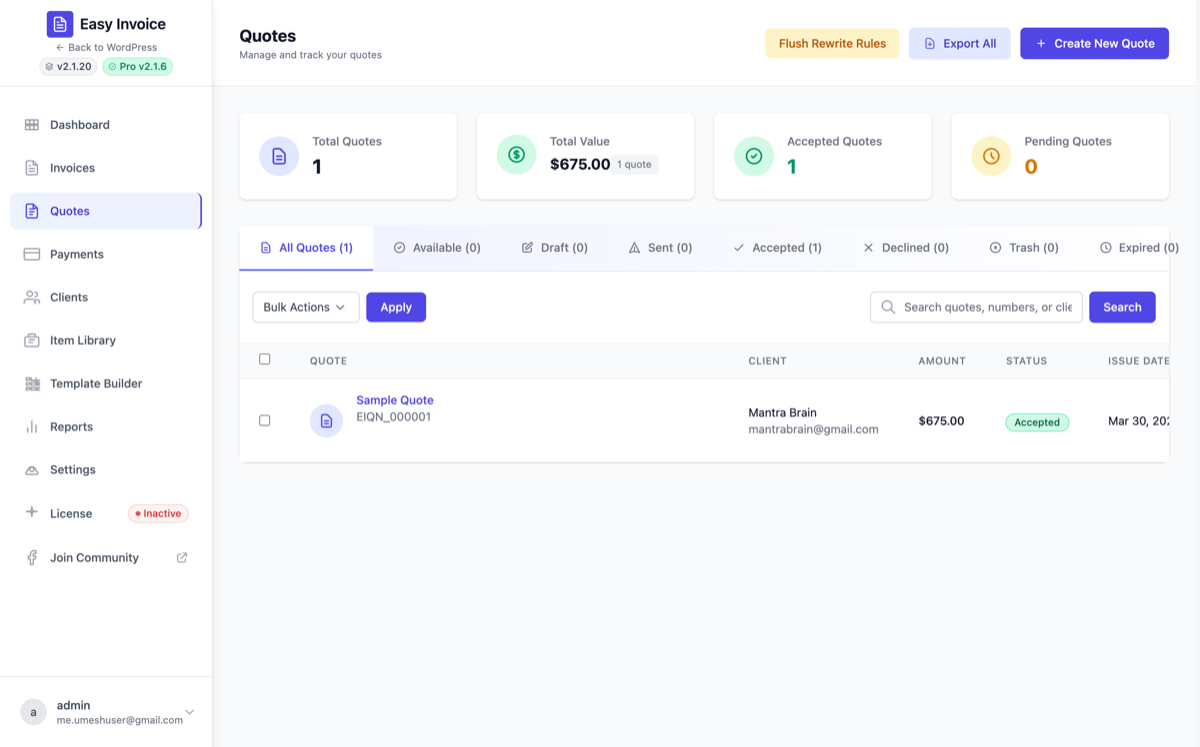
A quote (also called an estimate, proposal or in some countries a devis / cotización / presupuesto) is a price you send a prospective client before the work starts. Easy Invoice's quote builder is almost identical to the invoice builder, with three extra pieces:
- Valid Until Date — when the price expires.
- Accept and Decline buttons on the public quote page.
- One-click conversion to an invoice once the client accepts.
The free plugin includes everything below — no Pro upgrade needed for quotes.
When to use a Quote vs. an Invoice
| Use a Quote when... | Use an Invoice when... |
|---|---|
| Negotiating the price | Price is final |
| Client hasn't approved yet | Work is done or about to start |
| You need formal sign-off | Payment is now owed |
| Several pricing options | One agreed amount |
1. Open the Quote Builder
WP Admin sidebar → Easy Invoice → Add New Quote.
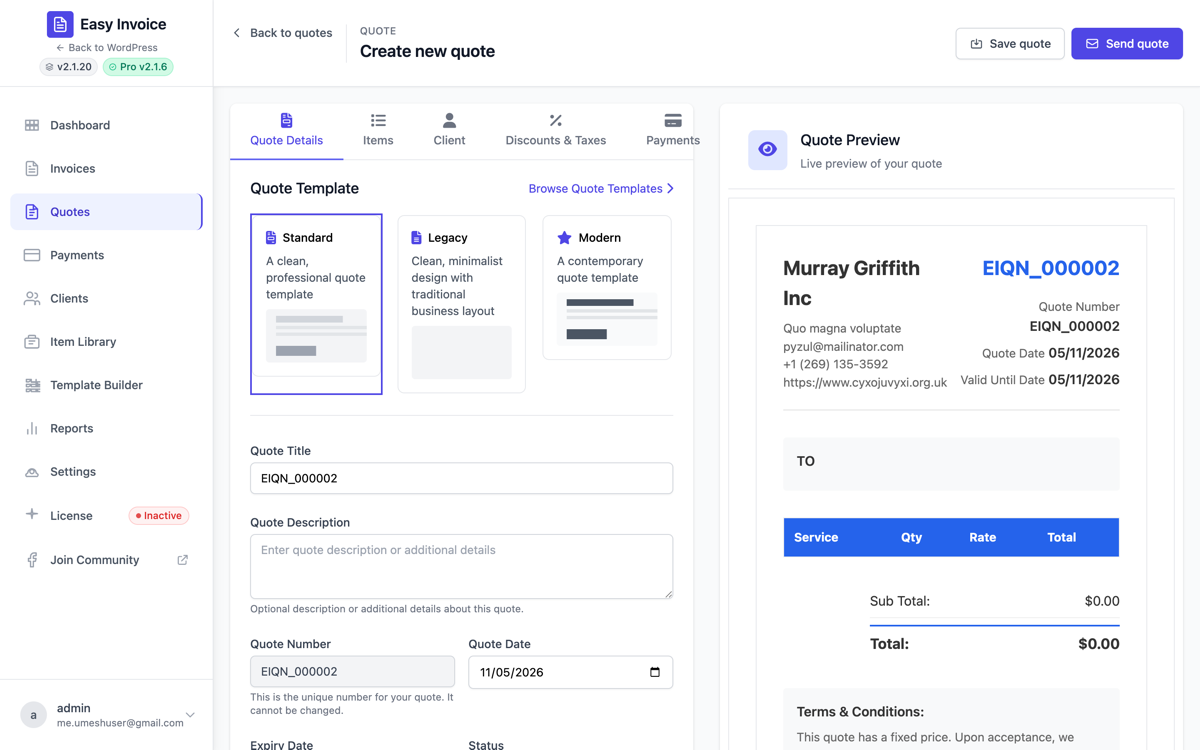
Like the invoice builder, the form has tabs:
- Quote Details — title, number, dates, status, notes
- Items — what you're quoting for
- Client — who the quote goes to
- Discounts & Taxes — discount + tax options
- Payment (optional) — preview gateways the client will use after acceptance
2. Quote Details — every field
Quote Title
Short label like "Website redesign — proposal v2". Helps you find it in the admin list.
Quote Description
Free-text paragraph for context. Often used for "Scope summary" paragraphs.
Quote Number
Auto-generated from your prefix + counter (default EIQN_0001). Change the prefix under Settings → Quote → Quote Prefix (try QT-, EST-, or 2026-Q-). Read-only here.
Quote Date
The day you issued the quote.
Valid Until Date
The most important field on a quote. It's the date your prices expire. Why it matters:
- Communicates urgency to the prospect.
- Protects you from old quotes coming back with stale pricing months later.
- Triggers the "Expired" status when the date passes.
Suggested default: Quote Date + 14 to 30 days.
Status
- Draft — internal only
- Available — live, the client can view, accept, or decline
- Accepted — client accepted (set automatically when they click Accept)
- Declined — client declined
- Expired — past Valid Until
- Cancelled — withdrawn
Notes
Visible to the client at the bottom of the quote PDF.
Internal Notes
Visible only to you. Use for "customer wants the cheap option but probably needs the premium plan — talk on Tuesday."
Terms & Conditions
Defaults to your global Settings → Quote → Terms & Conditions (which ships with: "This quote has a fixed price. Upon acceptance, we kindly ask for a 25% deposit..."). Override per quote if needed.
3. Items — same as invoices
Exactly the same line-item table as invoices: Title, Description, Quantity, Price, Adjust (%), Total, Taxable. See Invoices → Items tab for the field explanations.
4. Client tab — same dropdown as invoices
Pick from your All Clients list. The client's email is who receives the Quote Available email when you click Send.
5. Discounts & Taxes
Same options as invoices — Percentage / Fixed discount, Before/After Tax calculation method, Tax Rate, Price Includes Tax. See Settings reference → Tax if you're unsure.
6. Save → mark Available → send
- Click Save Draft if you're still editing, or
- Set Status to Available and Publish — the quote is now live at a public URL.
- Click Send Email to email the Quote Available template (configured under Settings → Email → Quote Available).
7. The public quote page — accept / decline
When the client opens the quote URL, they see:
- The full quote (logo, line items, totals)
- An Accept Quote button
- A Decline Quote button
What happens when they click Accept is controlled by Settings → Quote → Accept quote button action — six options:
| Action | Behaviour |
|---|---|
| Convert quote to invoice — Draft | Creates a new invoice from the quote. Status: Draft. You review/send it. |
| Convert quote to invoice — Available | Creates an invoice and publishes it. No email. |
| Convert quote to invoice and send to client — Available | Creates, publishes, and emails the invoice to the client. (Hands-off mode.) |
| Create new invoice, keep quote as-is — Draft | Like option 1, but the original quote keeps its Accepted status (rather than being "converted"). |
| Create new invoice and send to client, keep quote as-is | Like option 3, but keeps the quote alongside the new invoice. |
| Do nothing | The quote is marked Accepted; no invoice is created (manual workflow). |
Why six options? Different businesses convert quotes differently — some send the invoice immediately, others want a manual review step, some never auto-convert at all (e.g. legal, where the contract is the trigger, not the quote acceptance).
Decline Quote button
By default, the client can decline with no reason. Tick Settings → Quote → Decline Reason Required to force them to fill the "Reason for declining" textarea before they can submit — useful for win/loss analysis.
Accept / Decline messages
- Accept Quote Text — shown above the Accept button (a confirmation prompt).
- Accepted Quote Message — shown after a successful Accept.
- Declined Quote Message — shown after a successful Decline.
All three are rich-text editors under Settings → Quote. Customize them to match your brand voice.
Hide the Accept button entirely
Untick Settings → Quote → Accept quote button to hide it (you'd then accept the quote in admin manually).
Every quote also records when the client first and last opened it, shown in the list as "Viewed 1× · last 2 days ago" — useful before you follow up.
8. The quote list
WP Admin → Easy Invoice → All Quotes shows every quote with status filters.
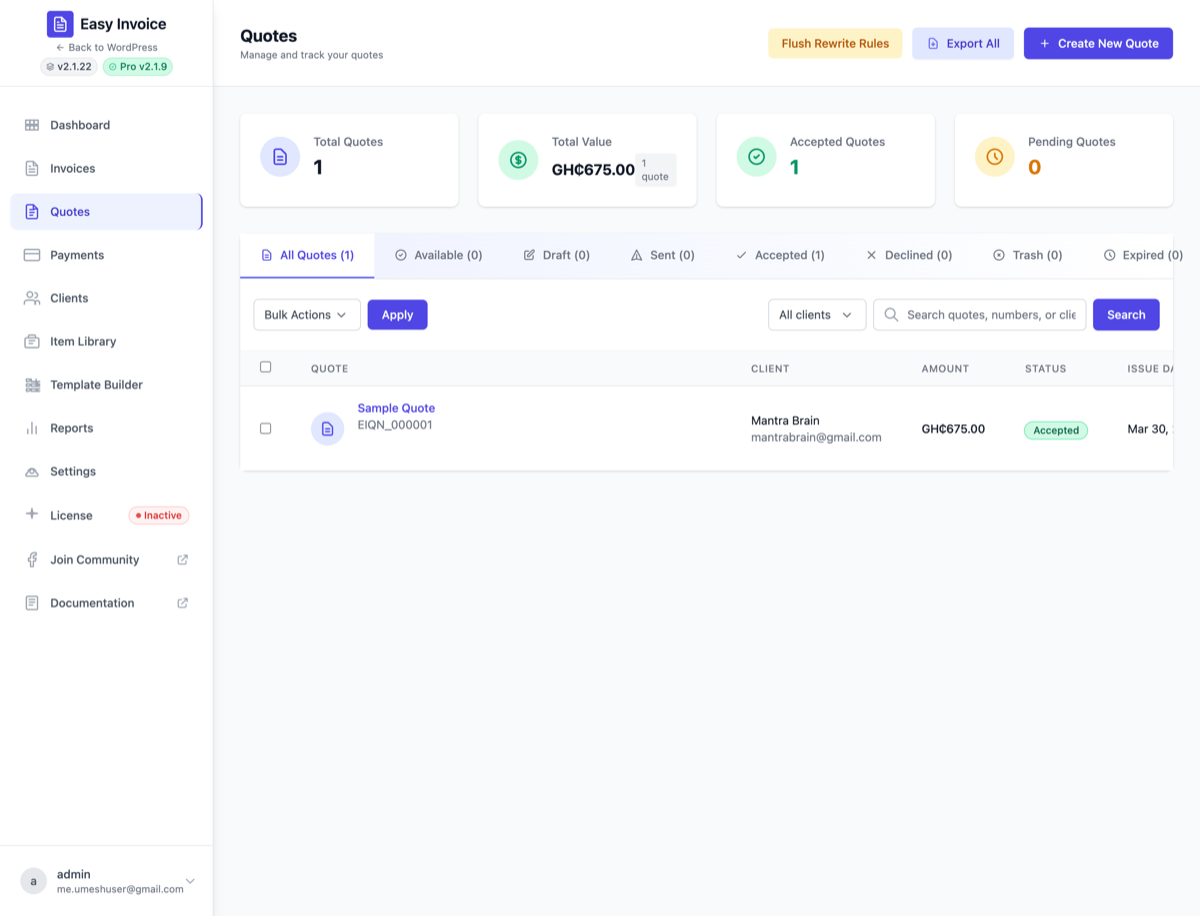
Filter by client (Free)
The Filter by client dropdown next to the search box narrows the list to one specific client's quotes — useful for "what did we last quote this prospect?" lookups. The filter persists across view tabs, status chips, pagination, and search.
Bulk Send Email PRO
With Easy Invoice Pro, the Bulk Actions dropdown gains a Send Email option for quotes too. Tick the rows, pick Send Email, click Apply — Pro dispatches the Quote Available email to every selected quote's client and reports a "Sent: X ok, Y failed" toast.
Bulk Export Selected PRO
Same flow as the invoice export: tick the quotes you want, pick Export Selected, confirm — your browser downloads easy-invoice-quotes-YYYY-MM-DD.csv.
Columns exported: Quote Number, Title, Client Name, Client Email, Quote Date, Expiry Date, Status, Subtotal, Tax, Discount, Total, Currency, Accepted Date, Declined Date.
Without Pro: the option shows as Export Selected (Pro) and picking it opens the Upgrade-to-Pro dialog.
Row actions
View, Edit, Duplicate, PDF, Send, Convert to Invoice, Delete.
9. Converting a quote manually
You don't have to wait for the client to click Accept. From the admin quote list:
- Find the quote.
- Row actions → Convert to Invoice.
- A new invoice is created with all the quote's items pre-filled. You can edit it, then send.
Quote-specific Pro features
| Feature | What it does |
|---|---|
| Quote watermarks PRO | Overlay DRAFT, EXPIRED, custom text or image on quote PDFs. |
| Custom permalinks PRO | Branded URLs like /proposal/your-quote/ instead of the default. |
| Email reply-to PRO | Quote emails go from a different reply-to than invoices. |
| E-signatures PRO | Accepting means signing: a drawn signature with the signer's name and time, printed on the quote, its PDF and the invoice made from it. Quote E-Signatures |
| Quote request forms PRO | A WPForms, Gravity Forms, Contact Form 7 or Fluent Forms submission opens a draft quote with the client already created. Quote Forms |
Tips
- Send a Quote first whenever the price is negotiable. It costs you nothing and gives the client a chance to push back without losing the deal.
- Set Valid Until Date conservatively — 14 days is fine for most jobs. If you set it to a year, you'll get quotes coming back with stale prices.
- Customize the Accept message so the client knows what happens next ("We'll begin work within 2 business days and email you a Phase 1 invoice for the 25% deposit").
- Auto-convert mode is hands-off magic. Set Accept button action to "Convert quote to invoice and send to client — Available" once you trust your template — no human in the loop.