
Payments
A Payment in Easy Invoice is a record of money received against an invoice. Payments can be created two ways:
- Automatically — when a client pays through PayPal, Stripe, Square, etc. The gateway webhook fires, a Payment is recorded, and the invoice is marked Paid.
- Manually — when you receive money outside a gateway (cash, wire transfer, cheque) and record it yourself.
WP Admin → Easy Invoice → Payments.
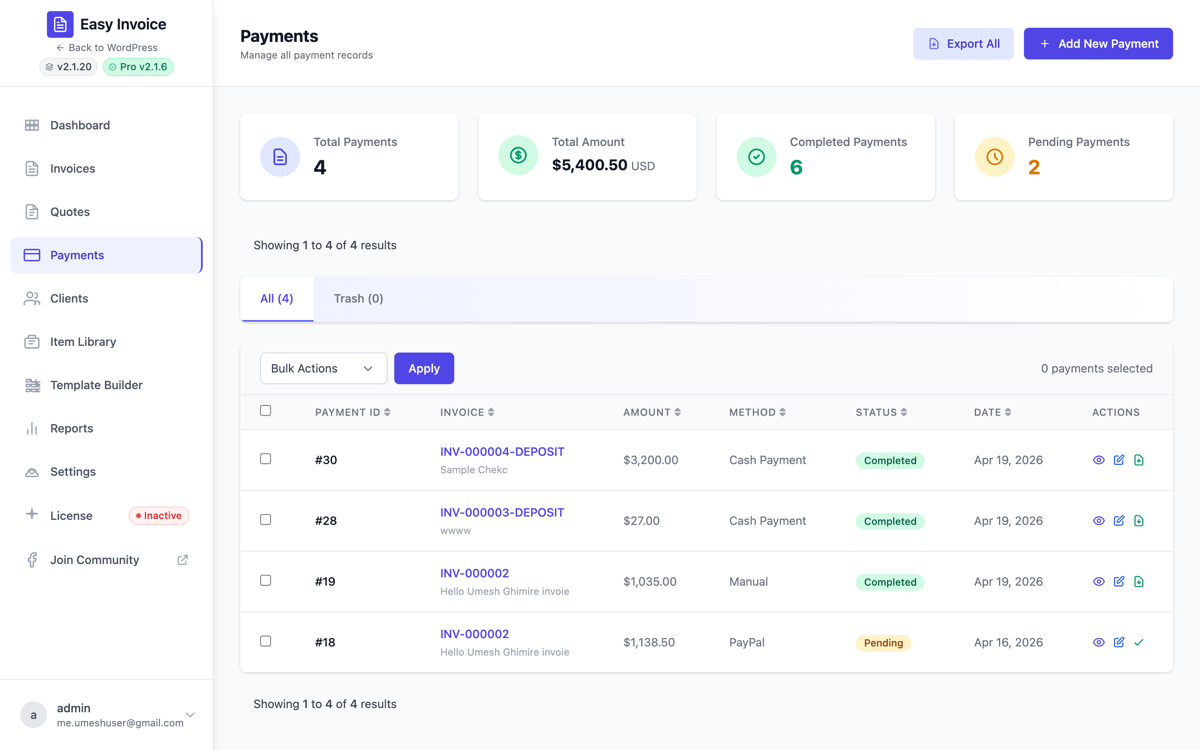
1. The Payments list
Every payment ever received shows up here, with:
- The associated Invoice Number
- Client name
- Payment Method (PayPal, Stripe, Manual, Bank Transfer, etc.)
- Amount
- Date
- Status (Paid, Pending, Refunded)
- Transaction ID (from the gateway)
Filter by status, method, or date range.
2. Record a manual payment
When a client pays you offline (cash, wire transfer you reconciled in your bank, cheque arrived):
- WP Admin → Easy Invoice → Add New Payment.
- Fill in:
| Field | Why |
|---|---|
| Invoice | Which invoice this payment is against (dropdown shows unpaid invoices). |
| Amount | The amount received. Can be less than the invoice total for partial payments. |
| Payment Date | When you actually received it. |
| Payment Method | Manual / Cash / Bank Transfer / Cheque / Other. |
| Transaction Reference | Optional — the bank reference, cheque number, or any text. |
| Notes | Internal notes ("client paid in person", "wire from Acme Bank ref ABC123"). |
- Click Save.
The invoice updates automatically:
- Full payment ⇒ status flips to Paid.
- Partial payment ⇒ remaining balance shown; status stays Unpaid until full balance is collected.
- The Payment Received email goes out to the client (unless you disable it in Settings → Email → Payment Received).
3. Partial payments PRO
If you've enabled Settings → Invoice → Enable Partial Payments, Easy Invoice Pro lets the client pay in installments via the public invoice page. The flow:
- Client opens the invoice URL.
- They pick an amount: a free amount, one of your fixed presets, or a percentage preset (configured in settings).
- The gateway charges that amount only.
- Easy Invoice records the partial payment and updates the invoice's Remaining Balance.
- The client can return any time and pay another installment.
See Settings reference → Pro-only invoice settings for the full set of partial-payment configuration fields.
4. Refunds and credit notes
Easy Invoice keeps the record; the money moves in your gateway.
To record a refund of a payment
- Open the payment record and change its Status to Refunded.
- Refund the money itself in the gateway's own dashboard (Stripe, PayPal, Square…). Easy Invoice does not send refund instructions to gateways.
Marking a payment refunded removes it from the invoice's paid total, so the invoice shows as outstanding again.
To correct the invoice itself — issue a credit note (Easy Invoice 2.4.0+)
An invoice that has been sent (any status other than Draft) is a tax record: Easy Invoice will not let it be edited or permanently deleted. The lawful way to reduce or cancel it is a credit note — a separate numbered document (CN-000001, …) that references the invoice and records what was credited and why.
- All Invoices → on the invoice's row, click Credit note.
- Enter the amount (leave empty to credit the whole invoice) and a reason — it is printed on the document and is what your accountant reads a year later.
- Issue credit note. The PDF is available from the same page; the invoice row now reads Credited.
You cannot credit more than the invoice total, and a credit note itself is never deleted. With the E-Invoicing addon, credit notes are also available as Factur-X and UBL (type 381). With the WooCommerce addon, a WooCommerce refund issues one automatically.
Deleting an issued invoice by mistake is protected against at the database level too: the
easy_invoice_allow_issued_invoice_deletionfilter is the only way through, and it is meant for migrations.
5. Reports & exports
WP Admin → Easy Invoice → Reports for the free dashboard summary (this month's revenue, outstanding total).
With Pro, the Export tool (under Easy Invoice → Export) generates CSV exports for accounting:
- Invoices CSV (date, client, amount, status, gateway)
- Payments CSV (date, invoice, amount, method, transaction ID)
- Clients CSV
CSVs work with QuickBooks, Xero, FreshBooks, and any spreadsheet.
6. Common questions
"My invoice is still Unpaid even though Stripe says paid." → Webhook isn't connecting. Re-check Stripe webhook setup.
"How do I delete a wrong payment?" → Open the Payment, click Delete. The invoice's outstanding balance recalculates automatically.
"Can I move a payment to a different invoice?" → Yes — delete the payment from the wrong invoice and re-create it against the correct one. Or edit the Payment's Invoice field directly.
"Why does the invoice show Paid but no Payment record exists?" → Someone manually changed the invoice status without creating a Payment. The financials won't reconcile. Always record a Payment instead of editing status.