
Bulk Email & Export
The free Easy Invoice plugin handles invoices one at a time — open, edit, send, repeat. That's fine for the occasional invoice, but it falls apart when:
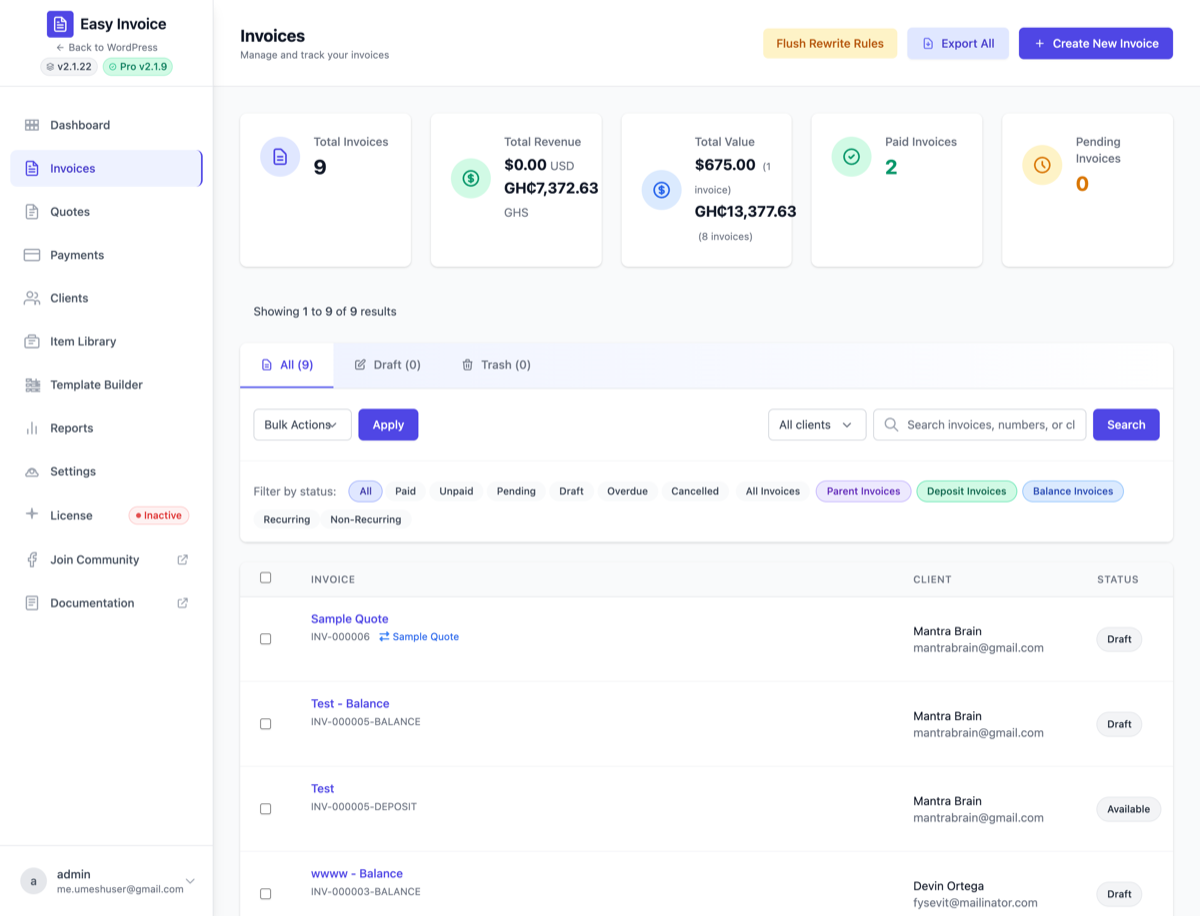
- It's year-end and your accountant wants every paid invoice exported as a single ZIP of PDFs.
- You need to re-send a batch of overdue invoices after a holiday break.
- You're migrating to a new accounting system and want every record as CSV.
- You're filing a sales-tax return and the auditor wants line-item-level export.
The Bulk Email & Export addon adds two things to every list screen (invoices, quotes, payments, clients):
- Bulk row actions — tick the rows you want, pick "Email selected" or "Export selected", click apply.
- "Export All" button — one-click export of the entire dataset for a list screen.
No configuration, no settings — flip the addon on and the bulk actions appear.
Plain-English problem this solves
Your accountant emails on January 5th asking for "all paid invoices from last year as a single PDF". Without this addon, you click each invoice, hit Download PDF, repeat sixty times, then bundle them up manually.
With this addon, you go to Easy Invoice → Invoices, filter by Status = Paid, click the checkbox in the table header (selects all visible rows), pick Export selected → PDF from the bulk action menu, click Apply. One ZIP file comes back with sixty PDFs. The whole task takes twenty seconds instead of half an hour.
When you need this
- Year-end / quarter-end accounting hand-offs.
- Sales-tax filings that require detailed invoice listings.
- Migrating to/from another invoicing tool (CSV export → import elsewhere).
- GDPR data-subject requests when a client asks for everything you have on them (use along with the Privacy & GDPR Tools addon).
- Bulk dunning — re-send a batch of unpaid invoices in one click during your monthly collections sweep.
If you only invoice a handful of clients a month, you can survive without this. Everyone else: turn it on.
Enabling
- Open Easy Invoice → Addons
- Find Bulk Email & Export
- Click Activate
There are no settings — the bulk action dropdown and "Export All" buttons appear automatically on every list screen. The addon is configured by behaviour (you tick rows and choose an action), not by a settings page.
How the bulk action menu works
Every list screen in Easy Invoice gains the same WordPress-style bulk action dropdown that core uses:
- Select rows — tick individual rows, or tick the header checkbox to select every visible row on the page.
- Pick an action from the dropdown — common options:
- Email selected — send the relevant transactional email (invoice/quote/receipt) to every selected client.
- Export selected as PDF — download a ZIP of PDFs.
- Export selected as CSV — single CSV with one row per record.
- Export selected as Excel — .xlsx file for spreadsheet apps.
- Click Apply — the addon performs the action and shows a progress indicator. Larger batches (hundreds of rows) run in the background and notify you when done.
How "Export All" works
Above the standard bulk action menu, the addon adds an Export All button. This ignores the row checkboxes and exports the entire dataset for the current list view, including rows on pages you haven't scrolled to.
Examples:
- Invoices → Export All as CSV — every invoice you've ever issued, with all metadata, in one CSV.
- Payments → Export All as CSV — every payment, useful for bank reconciliation.
- Clients → Export All as CSV — your complete client book for migration to a CRM.
Performance note: "Export All" on a list of 10,000 invoices can take a minute or two. The addon streams the export to a temporary file and gives you the download when ready — your browser doesn't hang.
What gets included in CSV exports
CSV exports include every field that's visible on the list screen plus a handful of extras useful for accounting:
- Invoice CSV — number, status, client name, client email, issue date, due date, subtotal, tax, total, paid amount, balance, currency, payment method (if paid), notes.
- Payment CSV — invoice number, payment date, amount, gateway, transaction ID, status, currency.
- Client CSV — name, email, phone, company, billing address, shipping address, total invoiced lifetime, total paid lifetime.
The CSV opens cleanly in Excel, Google Sheets, Numbers, and any text-based accounting import.
What gets included in PDF exports
PDF bulk exports use the same template as the single-invoice PDF — including any PDF Toolkit watermarks, White-Label branding, or Custom Templates layouts you have configured.
The ZIP contains one PDF per record, named invoice-INV-2025-001.pdf (or similar), so you can sort, attach to emails, or upload in bulk to your accounting tool.
Pairs well with
- Privacy & GDPR Tools — Pair the addon's bulk export with the privacy tools' data-subject export to hand a complete history to a requesting client.
- PDF Toolkit — Every bulk-exported PDF inherits your watermark / branding settings.
- Smart Reminders — Reminders handle the automated chase sequence; Bulk Email lets you fire off a one-off batch when needed (e.g. "Friday-before-month-end mass reminder").
- Accounting Sync — If you're already syncing to QBO/Xero, you may not need the export at all — but it's still useful for one-off audits.
Troubleshooting
"The bulk action dropdown isn't appearing"
- Confirm the addon is Active in Easy Invoice → Addons.
- Confirm you're on a list screen (Invoices, Quotes, Payments, Clients) — not a single-record edit screen.
- Hard-refresh the page (Ctrl+Shift+R or Cmd+Shift+R).
"Export All times out / fails on very large datasets"
- Increase your PHP
max_execution_time(typically inphp.inior via a hosting control panel). Try 300 seconds. - For 50,000+ rows, consider exporting in date-range filtered chunks instead of "Export All".
- If you have the Accounting Sync addon, the periodic sync is probably a better fit for ongoing exports.
"My bulk-emailed invoices aren't being delivered"
- This is almost always a deliverability / SMTP issue, not the addon. Bulk-emailing 200 invoices in one minute from a generic hosting IP often triggers spam filters.
- Install an SMTP plugin (WP Mail SMTP, FluentSMTP) and route through a transactional provider (Postmark, Mailgun, SendGrid, Amazon SES).
- Limit batch sizes to ~50–100 emails per minute for best results.
"Bulk PDF export downloads but the ZIP is empty / corrupted"
- Check your PHP memory limit (
memory_limitinphp.ini). Generating dozens of PDFs simultaneously can hit 256 MB. Raise to 512 MB if needed. - Check disk space on the server — temp files for large exports need free disk.
Settings location
There are no settings. The addon is fully behaviour-driven — flip it on and use the bulk-action dropdowns and Export All buttons that appear on every list screen.
See also
- Privacy & GDPR Tools — for compliance-specific exports
- PDF Toolkit — controls how bulk-exported PDFs look
- Accounting Sync — if you'd rather sync to QBO/Xero than manually export